
A webhook is a mechanism that allows one application to provide real-time information to another application when a specific event occurs.
Think of webhooks as "reverse APIs" where instead of you requesting information, the SaaS pushes information to you when important events happen.
— from Claude 3.7 Sonnet
AI explains this feature very well. You can use Quotion to watch your note changes without managing a complex server infrastructure! You can use it to build your own documentation, blog, portfolio, or even mobile apps. You can think of this feature as CMS (Content Management System).
How to Enable It
Prerequisites
- A http server to handle POST requests
- HTTPS is required
- A database is recommended to save your note data
- Postgres, MySQL, MongoDB or Redis are all good choices
- Memory cache or local file cache are also fine
Quotion settings
- Log in to Quotion dashboard
- Go to a site settings page
- Configure a webhook URL and authorization header
- Save the configurations
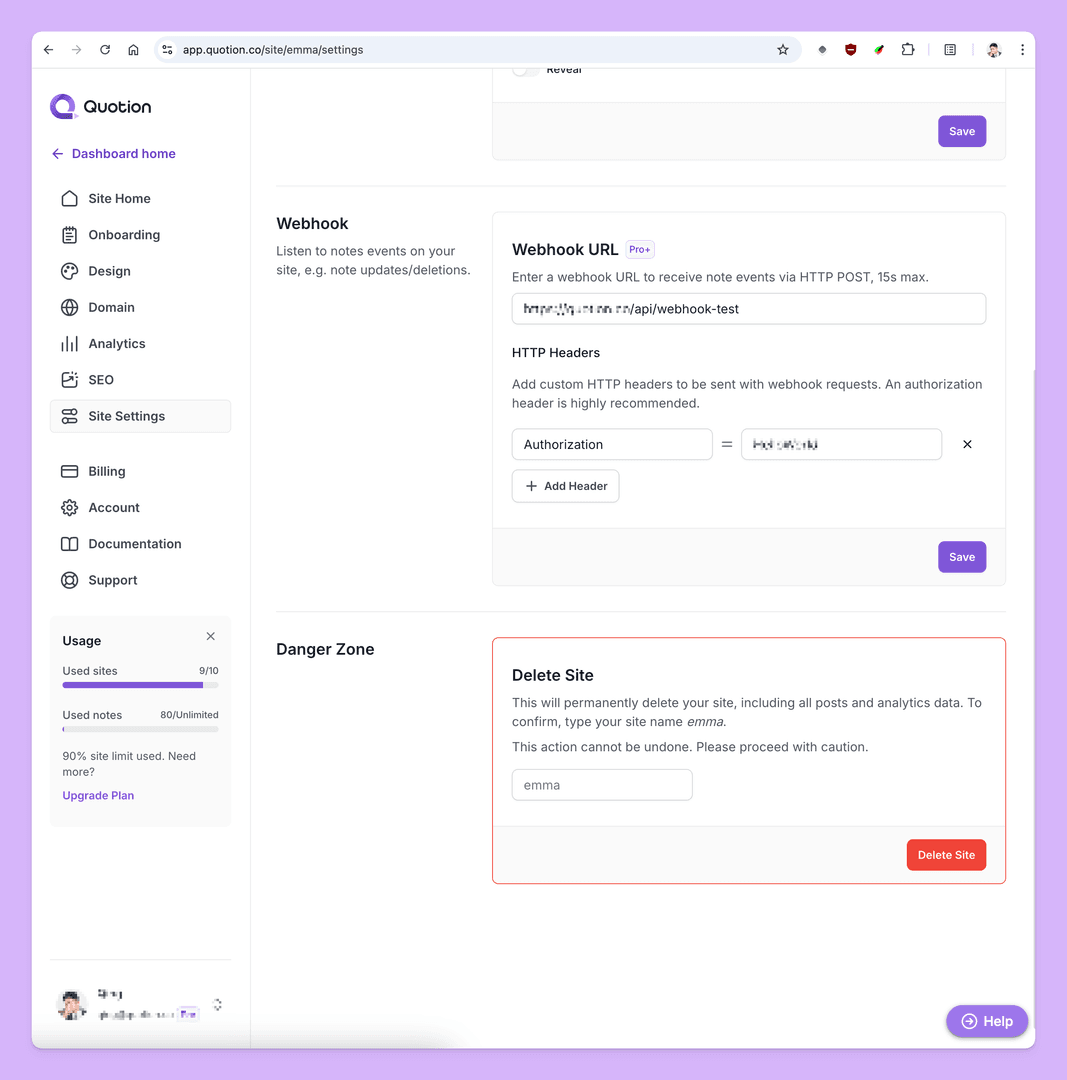
Once you have saved the webhook configurations, try making some changes to your site notes. Your HTTP server should receive events within 2 minutes.
Webhook request
Security check
Before parsing note data, you should check if the request has proper authorization header, abort it if it fails the check. This is highly recommended to protect your system.
A naive Next.js route example:
import { type NextRequest } from 'next/server';

export async function POST(req: NextRequest) {
  if (req.headers.get('authorization') !== 'MySecretToken') {
    return Response.json({ message: 'Unauthorized' }, { status: 401 });
  }
  return Response.json({ message: 'Webhook received' });
}
Request body
A simple webhook event request body:
{
  "site": {
    "id": "8652bd70-b55d-43ad-99d2-422c7957d24b",
    "subdomain": "emma"
  },
  "posts": [
    {
      "id": "suLA7Gc4ajawG4LLtHtSQ2",
      "md": "hello world,\n* [ ] milk\n* [ ] egg\n* [ ] potato\n* [ ] carrot\n",
      "title": "A new note",
      "draft": false,
      "featured": false,
      "hidden": false,
      "createdAt": "2025-03-06T07:44:44.8572",
      "updatedAt": "2025-03-0608:08:05. 212Z",
      "type": "added"
    }
  ]
}- Every request has a site property to indicate which site triggers the events
- Posts have a list of note events
- type indicates what kind of event it is, it has 2 values
addedandremoved. Note: all updates areaddedevents in Quotion - md means markdown format of the note
- type indicates what kind of event it is, it has 2 values
Need more?
If you need more properties or more events, feel free to share your scenarios with us:
FAQs
1. How long can I process a request before it’s aborted?
Quotion sets a 15-second timer for every webhook request. If your server doesn’t handle the request within 15 seconds, it will be aborted and retried later.
Your server should respond to the request as soon as possible and handle the data processing later. If you’re using a serverless platform like Vercel, you can use the waitUntil or Next.js 15 after API.
2. How many times will Quotion retry failed webhook requests?
Quotion retries a failed webhook request up to 3 times. If the request fails again after 3 attempts, we’ll send a notification email to you. If the request fails continuously for 3 times, we’ll disable your webhook.
Create your blogs directly from Apple Notes.
Say goodbye to complex CMS updates and management issues!
You focus on creating quality content while Quotion takes care of the rest.
Subscribe to Quotion
Get the latest posts delivered to your inbox. No spam, unsubscribe anytime.
Latest
More from the site
Qing
ProductUpdate
Post visibility and search engine indexing controls
#ProductUpdate We're excited to introduce new features that give you more control over your posts! Post visibility Control whether posts appear in your site's content listing while remaining accessibl
Read post
Qing
ProductUpdate
Post scheduling and published date editing
#ProductUpdate We’re excited to announce 2 new features: you can now schedule posts to go live at a specific time and edit the published date of your posts! How to schedule a Post Need to announce som
Read post
Qing
ProductUpdate
Layout editor
#ProductUpdate 🔥 I'm so excited to announce that the layout editor is live now. You can easily edit your site layout inside the design page, home note is no longer needed! All home note functionalit
Read post